Auteur/autrice : epo079

  • Secret Network, Osmosis, and DeFi on Cosmos: Private-by-design assets meet permissionless AMMs

    Here’s a counterintuitive starting claim: privacy-enabled smart contracts and high-throughput interoperable DEXes are complementary, not opposites, for a Cosmos user focused on secure staking and cross-chain transfers. At first glance privacy (Secret Network) and liquidity (Osmosis) answer different user needs — one hides data, the other moves it quickly — but the architecture and incentives of the Cosmos ecosystem make them natural partners for safer, more flexible DeFi. Understanding how they mesh — and where the seams tear — is essential for US-based Cosmos users who care about custody, compliance friction, and the operational risks of staking and IBC transfers.

    In plain terms: Secret Network offers encrypted smart contracts that keep inputs, outputs, or state private; Osmosis provides an automated market maker (AMM) and on-chain order books specialized to Cosmos tokens and IBC-enabled liquidity. Together, they create the possibility of private asset management with open liquidity, but that possibility comes with technical trade-offs and legal-operations questions that matter in practice.

    Keplr wallet icon representing a secure Cosmos wallet interface for staking and handling IBC transfers, useful when connecting to Osmosis and Secret Network

    How Secret Network and Osmosis work at the mechanism level

    Secret Network runs smart contracts inside trusted execution environments (TEEs) so contract state and inputs are encrypted on-chain. Mechanistically, data is encrypted before entering the public ledger; validators run computation on ciphertext inside secure enclaves that reveal only authorized outputs. That preserves confidentiality for contract participants and enables use-cases like private lending terms, private automated market-making, or private identity attestation. But « private » here means confidentiality from other chain participants; code and gas usage remain auditable in aggregate.

    Osmosis is an AMM built within the Cosmos SDK that prioritizes composability across IBC-enabled chains. It implements concentrated liquidity, customizable fee structures, and features like multi-hop swaps that move tokens across IBC-connected zones. Osmosis’ design emphasizes programmability for liquidity providers (LPs) and traders, making it a liquidity hub for Cosmos native assets.

    The practical coupling happens through IBC (Inter-Blockchain Communication): assets on Secret or other Cosmos chains can be transferred via IBC channels into Osmosis pools for swapping or LP provisioning. For a staker or treasury manager using a secure wallet, that means you can stake your tokens on one chain, move them privately through smart contracts, and still access broad liquidity on Osmosis when needed — provided the assets are IBC-compatible and the privacy-preserving flow is supported end-to-end.

    Where the benefits are real — and where they break

    Benefit 1 — Confidential economic activity: If you’re managing a position that would reveal sensitive trading strategy or institutional flows, Secret Network can mask bid sizes, loan terms, or collateral ratios. That reduces frontrunning and MEV exposure when interacting with on-chain counterparties.

    Benefit 2 — Interoperable liquidity: Osmosis’ AMM provides low-friction swaps among IBC assets, often with better price efficiency than bridging solutions that route assets through external custody. For US users, this reduces reliance on centralized exchanges for on- and off-ramps, keeping custody decisions within wallet control.

    Where it breaks — complexity and subtle leaks: Privacy at the contract layer doesn’t automatically make an end-to-end flow private. IBC transfers, relayers, and bridge logic can leak metadata (timing, amounts, counterparty addresses) unless the entire path is engineered for privacy. Similarly, funding a private contract from a public address or withdrawing to a public pool can re-link activity. Operationally, users must think in chains, not single transactions: privacy requires consistent practices and supporting infrastructure.

    Where it breaks — auditing and regulatory friction: Encrypted state complicates classical audit approaches. Validators and developers can attest to code correctness, but auditors and compliance teams in the US may need novel evidence chains (e.g., reproducible zero-knowledge proofs or curated oracle attestations). The trade-off is clear: stronger privacy can raise the bar for regulatory acceptance unless supplemented by transparent governance and optional selective disclosure mechanisms.

    Trade-offs: latency, gas, and usability

    Secret contracts typically require extra cryptographic steps and off-chain enclave work; that can raise gas costs and increase latency compared with equivalent transparent contracts. Osmosis is optimized for throughput but faces its own structural costs: concentrated liquidity and custom pool logic require LPs to take on active management risk. For a staker moving assets between chains to capture yield, that means choosing between frictionless passive liquidity (lower returns, lower management overhead) and active strategies that can benefit from private execution but demand operational discipline.

    Usability trade-offs are where most users stumble. Secure wallets must handle IBC channel selection, relayer choices, and contract interaction nuances. For Cosmos users, wallet software that integrates both Secret Network keys and IBC flows — while letting you manage staking validators and slashing protections — materially reduces human error. A practical choice is to use a wallet that supports Cosmos account abstraction while giving fine-grained control over transaction memo fields and contract permissions; many users rely on wallet extensions or mobile apps that combine these features into one interface.

    Operational guidance: a decision-useful framework

    Here’s a simple heuristic for whether to route an asset through Secret contracts before using Osmosis liquidity: ask three questions — (1) does the position reveal a strategic advantage if observed? (2) will I need to later prove provenance or transaction intent for compliance? (3) can I keep the entire transfer path within IBC-compatible, privacy-aware tooling? If the answer is yes to (1) and no to (2), a privacy-first flow can be valuable. If you answer yes to (2), plan for selective disclosure mechanisms or avoid irreversible privacy steps.

    Practically, your workflow might look like this: hold stake in your validator of choice via a secure wallet; when you need liquidity, move funds through an IBC-enabled Secret contract that obfuscates trade size; relay into Osmosis via an IBC channel that you control or trust; provide liquidity or swap; withdraw back to a controlled address. At each hop, log the relayers and retain signed messages — these are your audit trail if needed.

    For users who want a wallet that helps manage these steps, consider wallets that integrate Cosmos signing and provide clear IBC controls while supporting Secret Network transaction types. A wallet with robust UI/UX for channel selection and memo visibility reduces costly mistakes when bridging or staking.

    What to watch next — conditional scenarios

    Signal 1 — UX integration: If wallets and relayer services converge on integrated flows (staked positions, Secret contract calls, and Osmosis swaps in one UX), adoption will rise because the cognitive load for secure, private DeFi declines. Signal 2 — regulatory clarity: US regulatory signals that accept selective disclosure (auditable privacy) rather than blanket bans would make institutional use-cases plausible. Signal 3 — tooling for privacy-preserving proofs: on-chain proofs that demonstrate compliance without revealing secrets would bridge the gap between privacy and auditability.

    Each of these is conditional. Better UX will matter only if the underlying privacy model proves interoperable at scale. Regulatory clarity would change institutional incentives but requires political processes outside the tech stack. And cryptographic proofs are promising but add engineering and gas costs that must be justified by user value.

    One small practical nudge: if you actively stake or do IBC transfers in the Cosmos ecosystem, use a wallet you control and understand the relayer choices. For many readers, a friendly, full-featured Cosmos wallet that supports both Secret Network interactions and IBC flows will shorten the learning curve and reduce custody risk; a commonly used option in the Cosmos community is keplr.

    FAQ — common questions for Cosmos users

    Does using Secret Network mean my transactions are invisible on Osmosis?

    No. Secret Network encrypts contract state and inputs at the contract layer, but when assets move via IBC into Osmosis, some metadata (timestamps, channel identifiers, and sometimes amounts depending on implementation) can be visible. True end-to-end privacy requires careful control of the whole path, not just the contract.

    Can I stake, use Secret contracts, and provide liquidity without going through a centralized exchange?

    Yes — that’s one of Cosmos’ strengths. IBC + native staking lets you keep assets in non-custodial wallets while interacting with Secret contracts and Osmosis pools. The caveat: ensure your wallet supports the necessary contract types and IBC channel selections, and be aware of relayer trust assumptions.

    Are there additional fees or risks when combining privacy contracts with AMMs?

    Expect higher gas and operational complexity. Secret contracts can add compute overhead; moving assets across channels may incur relayer fees and expose you to bridge or slashing risks if you mismanage staking positions. There is also potential regulatory scrutiny, particularly for larger flows: build an audit plan.

    How do I choose between concentrated liquidity strategies on Osmosis and passive pools?

    Concentrated strategies can deliver higher returns but require active management and tighter risk controls; passive pools are simpler and safer for many users. If privacy is a priority, concentrated strategies might interact poorly with leakage risks unless executed via private contracts that mask order intent.

    Conclusion — Secret Network and Osmosis are not competing endpoints but complementary tools within Cosmos: one protects transactional detail, the other supplies on-chain liquidity. For US-based Cosmos users the calculus combines technical design, operational discipline, and regulatory awareness. The upshot is pragmatic: privacy-enabled DeFi can reduce execution risk and exposure, but it requires end-to-end thinking — wallets, relayers, contracts, and governance must be treated as an integrated system rather than isolated features. Watch for better tooling, legal clarity, and composable proofs; those will be the real enablers of private, liquid, and auditable DeFi in Cosmos.
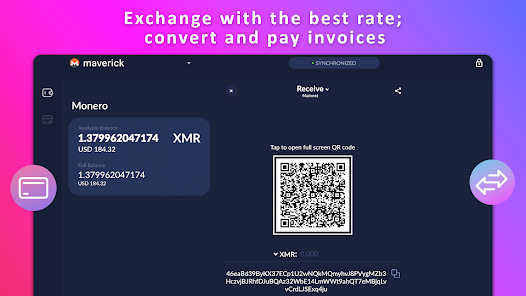
  • When “Private” Actually Means Protected: Choosing a Mobile Privacy Wallet for Monero, Bitcoin, and Beyond

    Imagine you live in a U.S. city and want to move savings into crypto to protect against account freezes or to support a small business that prefers privacy-respecting payments. You care about both convenience — a phone you can use at a café — and the assurance that your transaction history, IP address, and keys won’t leak to third parties. That concrete tradeoff — mobility versus confidentiality — is exactly where modern privacy wallets live and where many users make costly mistakes.

    This commentary unpacks how a high-quality mobile privacy wallet actually protects you, what it cannot do, and how feature choices change the balance between usability and plausible privacy. I draw on the architecture and capabilities common to advanced privacy-first wallets (examples include Monero support, optional Tor routing, hardware signers, and device-level encryption) and synthesize the practical implications for U.S. users looking to store or move Monero (XMR), Bitcoin (BTC), Haven (XHV), and other assets.

    Screenshot-like visual showing a mobile wallet UI and privacy features (Tor, subaddresses, hardware integration) to illustrate privacy-layer options on a smartphone

    Mechanisms: How a Privacy Mobile Wallet Works (and Why Each Layer Matters)

    Think of a privacy wallet as a stack of defenses, each addressing a different leakage channel. The most relevant layers are key custody, transaction construction, network routing, and device security. Here’s how they interact in practice and why they matter.

    First, custody. Non-custodial design means the private keys never leave your device; they are not stored by the developer or on a server. That’s foundational: if someone else holds the keys, your privacy and control vanish. A well-built wallet keeps the private view key (important for Monero) and signing keys strictly local, and many modern wallets explicitly ensure the Monero private view key never leaves the phone. This alone doesn’t guarantee anonymity, but it prevents remote custody risks and reduces the attack surface to the device and the user’s operational security.

    Second, transaction mechanics. For Bitcoin, privacy hinges on how inputs and outputs are chosen. Tools such as PayJoin (now evolving to PayJoin v2), silent payments, UTXO-level coin control, and transaction batching are practical techniques to reduce linkability. PayJoin breaks the clear ‘single-sender’ model by having recipient contribute inputs, which confounds heuristic clustering used by chain analysis firms. UTXO coin control lets users decide which outputs to spend, preventing accidental consolidation that paints a clearer ownership trail. For Litecoin, optional MWEB (MimbleWimble Extension Blocks) adds an extra privacy layer by aggregating and obfuscating amounts and ownership — optional, because it changes interoperability.

    Third, network privacy. Even perfect on-chain privacy can be pierced by network-level leaks: your IP, timing, and node connections can correlate you with addresses. A wallet that supports Tor-only mode, I2P, or custom node connections gives users the means to hide where transactions originate. This is especially important in the U.S., where ISPs and service providers can be compelled to hand over metadata. Use of Tor or I2P is not a magic bullet — misconfiguration, DNS leaks, or connecting to hostile nodes can still expose metadata — but these modes raise the bar substantially.

    Fourth, device-level security. Wallet data encrypted using device hardware (Secure Enclave on iOS or TPM on Android) and protected by a PIN/biometrics reduces the risk of extraction if your phone is seized or stolen. Hardware wallet integration (Ledger, or air-gapped solutions like Cupcake) adds a further layer: signing happens off the phone or in an isolated environment, so even a compromised phone cannot produce valid signatures without physical approval. This combination — local keys, hardware-backed encryption, and optional air-gapped signing — is what turns a mobile wallet from a convenience toy into a defensible privacy tool.

    Concrete Trade-offs: Where Privacy Wallets Shine and Where They Break

    These mechanisms are powerful but not omnipotent. Understand the trade-offs so you can match a wallet’s design to your risk model.

    Trade-off 1 — Convenience vs. Opsec discipline. Built-in swaps and instant exchange features (using decentralized routing like NEAR Intents) make it easy to move between BTC, XMR, ETH, and Haven (XHV) without using a centralized exchange. That convenience reduces on-chain exposure to regulated platforms. But swapping inside a wallet can create new linkages if you reuse addresses or rely on custodial liquidity providers. Good practice: use new subaddresses for receipts, and understand whether a swap path reveals amounts or parties to intermediaries.

    Trade-off 2 — Privacy-by-default vs. user control. Some wallets enforce privacy — for example, forcing Zcash to be shielded when sending out — which prevents accidental leaks. Enforced behaviors are protective for non-expert users, but they can reduce flexibility for advanced users who need transparent transactions for compatibility. Similarly, optional features like Litecoin’s MWEB require activation; users must weigh compatibility with exchanges and counterparties against improved confidentiality.

    Trade-off 3 — Network anonymity vs. speed/reliability. Tor and I2P routing hide IP metadata but can slow sync times or create usability issues with push notifications. In the U.S., the privacy benefits are significant because surveillance and legal processes can yield logs; yet for time-sensitive business transactions, the delay might be impractical. A pragmatic compromise is to use privacy routes for balance consolidation and high-value transfers and less-private connections for low-stakes monitoring.

    Trade-off 4 — Non-telemetry vs. support. A strict zero-data collection policy improves privacy posture but reduces the telemetry developers can use to diagnose bugs. In practice, that means support interactions may require users to volunteer logs or steps, and some edge-case bugs may persist longer. This is a conscious trade: you accept a higher maintenance burden in exchange for a reduced exposure of your device metadata.

    Common Misconceptions and a Sharper Mental Model

    Two misconceptions recur among privacy seekers. First: “Using Monero automatically makes everything invisible.” Not true. Monero provides stronger default privacy than Bitcoin, but operational errors — reusing addresses, leaking view keys, or running a wallet in a clear-IP environment — degrade privacy. The sharper model: privacy is an interaction between protocol properties (ring signatures, stealth addresses, confidential transactions) and operational hygiene (node choice, network routing, key management).

    Second: “A mobile wallet is inherently insecure.” That’s an over-simplification. Mobile devices have attack surfaces, but modern security primitives — hardware-backed encryption, PIN/biometrics, and hardware-wallet integrations — can make a properly used mobile setup defensive enough for many threats, including casual theft and remote compromise. The right question is threat-specific: against a targeted nation-state with device malware and physical seizure, only air-gapped, compartmentalized workflows and stringent opsec offer high assurance. For everyday privacy from data brokers, advertisers, and casual snooping, a non-custodial, hardware-backed mobile wallet combined with Tor/I2P is often sufficient.

    Decision Framework: How to Choose and Configure a Wallet

    Use this short heuristic to evaluate choices with clarity:

    1) Identify your threat model. Are you protecting from account freezes and data brokerage, or from well-resourced forensic investigators? The former requires strong privacy hygiene and a non-custodial wallet; the latter requires air-gapped signing and careful operational policies.

    2) Map assets to features. If you intend to hold Monero and Litecoin with MWEB, prioritize a wallet that supports native XMR background sync, subaddresses, and optional MWEB. If you use Bitcoin professionally, ensure PayJoin v2, UTXO coin control, and batching are supported.

    3) Prioritize network anonymity. If ISP-level metadata matters, use wallets that offer Tor-only or I2P modes and allow custom nodes. Test them: confirm that the wallet can sync and broadcast through Tor reliably before moving significant funds.

    4) Add hardware signing for large amounts. For life-changing sums, integrate a Ledger or an air-gapped signer like Cupcake. Even with a secure phone, hardware signing reduces the remote attack surface dramatically.

    5) Operational checklist: use fresh subaddresses for receipts, avoid address reuse, keep the private view key local for Monero, back up seed phrases securely, and remember that Zcash migrations from some other wallets (Zashi) require manual transfers because of incompatible change-address handling.

    What to Watch Next: Signals and Near-Term Implications

    Three signals matter for U.S. users over the next 12–24 months. First, regulatory attention to privacy-preserving features may increase; watch how exchanges and custody providers adapt to MWEB and shielded ZEC flows. Second, the usability gap for high-assurance workflows (easy air-gapped signing, seamless Tor integration) is narrowing; expect improved UIs but remain cautious about hidden trade-offs. Third, cross-chain privacy routing (decentralized systems like NEAR Intents used for swaps) will grow in importance: they reduce reliance on custodial intermediaries but create complex privacy dynamics that users must understand before relying on them for anonymity.

    Each of these trends is conditional: regulatory moves could restrict some features, or improved tooling could make higher-assurance privacy accessible to many more users. Monitor developer transparency (open-source code, no-telemetry policies), hardware integration options, and whether default behaviors favor privacy-by-default or user choice.

    FAQ

    Q: Is a mobile privacy wallet sufficient for holding Monero securely in the U.S.?

    A: For most individuals protecting against data collection and casual targeting, a mobile non-custodial wallet with device encryption, Monero-specific controls (background sync, subaddresses), and Tor/I2P routing provides robust protection. For state-level adversaries or scenarios involving device seizure, add hardware-backed signing and compartmentalized workflows; understand that no single tool makes you invulnerable.

    Q: How does swapping inside a wallet affect privacy?

    A: Built-in swaps using decentralized routing (e.g., NEAR Intents) reduce exposure to centralized exchanges but can create linkage if intermediate market makers record trade metadata or if you reuse addresses. The privacy outcome depends on implementation: some decentralized routes reveal less counterparty data than a centralized exchange, but they are not automatically anonymous. Use fresh addresses and review swap path disclosures where available.

    Q: Should I use Tor for every transaction?

    A: Tor materially improves network anonymity and is recommended when privacy concerns are significant. However, Tor can slow sync times and may interfere with real-time notifications. A pragmatic approach: use Tor for meaningful transfers and balance checks where anonymity matters, and a faster connection for low-risk monitoring.

    Q: What about Haven (XHV)? Is it supported and private?

    A: Wallets that support Haven let you hold and transfer XHV alongside Monero and other assets. The privacy properties depend on Haven’s protocol design and the wallet’s implementation. Treat it like any other asset: confirm background sync behavior, keys remaining local, and whether the wallet exposes any additional metadata during swaps or transfers.

    Final practical note: if you are specifically looking for a wallet with strong Monero integration, hardware wallet options, Tor/I2P support, and a no-telemetry stance, research wallets that combine these properties and test them with small amounts first. For an entry point focused squarely on Monero usability and privacy on mobile, consider exploring a dedicated monero wallet that exposes the features discussed above and verify the implementation choices against your threat model.

  • Misconception: The ChatGPT desktop app is just a prettier web page — what you actually gain (and lose)

    Many people assume the ChatGPT desktop app for macOS or Windows is merely the web interface in a boxed window. That’s the common instinct: a desktop client equals a nicer UI and faster startup. In practice the desktop experience changes how you interact with an AI assistant in small but consequential ways—keyboard shortcuts, companion windows, voice input, and tighter access to local files—that shape workflow, privacy choices, and expectations. This article walks through a concrete case: setting up and using the ChatGPT desktop app while working on a research brief and a small code repair, and draws out practical trade-offs, limitations, and decision heuristics for US users wondering whether to download it.

    Start with a short scenario. Imagine you are drafting a policy memo and debugging a snippet of Python that loads CSVs. You need quick clarifications, the ability to paste code and screenshots, and to ask the assistant without breaking focus. The desktop app promises faster resume, a companion window that stays on top, and keyboard-triggered access. Those features are useful, but they work within technical constraints and account settings that matter for what you can actually do and trust.

    Icon representing the ChatGPT desktop app; useful for showing cross-device continuity, voice, and file-import features

    How the desktop app changes the mechanics of assistance

    Mechanism matters. The desktop app is not a different model — it uses the same AI assistant family available through the web — but the client changes what signals the assistant receives and how quickly you can loop in context. Three practical mechanics to note:

    1) Companion window and keyboard access. The app often provides a lightweight overlay or a compact window you can summon with a hotkey. That reduces task-switching costs: instead of alt-tabbing to a browser tab, you type a question and immediately paste a stack trace or a paragraph of your draft. The faster feedback loop often changes the kind of questions you ask (more iterative debugging, more short clarifications), which in turn shapes the output you get.

    2) File, image, and screenshot workflows. Desktop clients typically make it simpler to drag files or screenshots into a conversation. Mechanically, that means the assistant has richer local context to summarize or edit. But note the boundary condition: access to local files depends on OS permissions and the app’s design; the assistant does not automatically index your disk. You must import or paste content for it to be used, and organizational policies may limit file sharing for enterprise accounts.

    3) Voice and multimodal features. When account, device, region, and app version permit it, the desktop app can enable conversational voice. That converts a typing loop into a speaking loop—useful for notes, brainstorming, or hands-free tasks. Yet voice is account- and region-dependent and may be disabled for some users; trusting voice input also means attending to ambient privacy risks (other people overhearing) and transcription errors that alter meaning.

    Trade-offs: speed and convenience versus control and governance

    The desktop app’s convenience introduces trade-offs that matter in professional use. One obvious benefit is productivity: keyboard hotkeys and an always-available overlay reduce friction. For a US-based knowledge worker juggling email, spreadsheets, and code, that friction reduction can translate into real minutes saved across a day.

    The cost side is twofold. First, governance: enterprise features like connectors, memory, or administrative controls differ by plan and organizational settings. If your IT policy forbids sensitive data from being uploaded to third-party services, the ease of dragging files into a chat becomes a policy risk unless you confirm the app complies with your rules. Second, perceptual control: the assistant may appear to have access to “everything” when it only has what you’ve given it; misreading that boundary can create overconfidence in the assistant’s situational awareness.

    Decision heuristic: ask two questions before you import content into the desktop app—(a) Do I have the right to share this data with an external AI service? and (b) Would I be comfortable if this content were included in account-level logs or backups? If the answer to either is no, use a local editor or redact sensitive fields before uploading.

    Where it breaks: limitations and surprising failure modes

    Expectations often outpace capability. The desktop app may reduce latency, but it does not eliminate hallucinations or logical errors from the underlying model. For code workflows, the assistant can suggest fixes and explain reasoning, but it can also propose syntactically plausible yet incorrect changes. Treat its outputs as draft proposals, not authoritative fixes.

    Cross-device continuity is powerful but conditional. Conversations can move between phone, web, and desktop, and the assistant preserves session history in most cases. Still, behavior is account-dependent: available models, connectors, memory, and tools vary by subscription and organization. That means a feature you use on your private account (say, a code interpreter or particular plugin) may not appear on a corporate-managed account.

    For more information, visit chatgpt download.

    Finally, safe download practices matter. The correct route for getting the app is through official OpenAI/ChatGPT pages or trusted app stores. Avoid third-party installers. For readers ready to install, an authoritative place to start is the official download listing; one convenient reference is this chatgpt download link to the provider page.

    Non-obvious insight: the interface shapes the questions you ask

    This is the conceptual deepening. Interfaces are not neutral. When access is a hotkey and files are drag-and-drop, users tend to ask more incremental, context-rich queries. That increases both the assistant’s utility and the risk of accidental disclosure. Conversely, a web tab behind many clicks encourages more planned, higher-level queries. Recognizing this helps you choose an operating mode: use desktop for iterative, ephemeral tasks (drafting, debugging), and use web or sandboxed environments for sensitive or review-bound work.

    Practically, you can enforce a simple workflow rule: ephemeral queries and quick drafts go through the desktop overlay; final reviews and anything requiring auditability happen in a controlled environment where you can export logs and annotate decisions.

    What to watch next — conditional signals and plausible scenarios

    Watch account-dependent feature announcements and enterprise controls. If OpenAI (or competing desktop clients) widens access to voice or deep connector integrations, the role of the desktop app will shift from convenience tool to an integrated work surface. Conversely, stricter enterprise governance or regional privacy rules could restrict import features and voice capabilities. Monitor release notes and admin dashboards for changes to model availability, memory behavior, and connectors—these are the levers that change what the assistant can actually do in practice.

    Also observe latency and local integration improvements. If future updates enable local model execution or hybrid on-device inference, that would materially change the privacy-performance trade-off. For now, assume model execution is cloud-based and plan workflows accordingly.

    FAQ

    Is the ChatGPT desktop app safer than using the web version?

    Not inherently. Safety depends on how you use it. The desktop app adds convenience and local-file handling, which can increase the chance of accidental uploads. Security improves only if you follow enterprise policies, use approved installers, and control what you paste or drag into the assistant. Always verify the download source and consider redaction for sensitive content.

    Can I use voice features on macOS or Windows?

    Possibly. Voice workflows are available when your account, device, region, and app version support them. Check your app settings and account features. Remember voice introduces extra privacy considerations (ambient listening, transcription accuracy) and may not be enabled for all accounts.

    Will the desktop app fix common AI hallucinations or bugs in code?

    No. The app changes interaction patterns but not the underlying model’s tendency to invent plausible-sounding but incorrect information. For code, use the assistant to generate candidate fixes and to explain reasoning, then validate changes with tests or code review. Treat outputs as drafts, not finished work.

    Where should I download the desktop app?

    Use official OpenAI or ChatGPT pages or trusted app stores. For a direct start, see this chatgpt download resource. Avoid third-party installers that may bundle unwanted software.

    How should teams govern desktop assistant use?

    Adopt clear rules: classify data before sharing, require redaction for sensitive fields, use account-level controls where possible, and log interactions when auditability is required. Train staff on what not to paste: personal data, credentials, and proprietary code without authorization.

  • What is Anthropic Claude’s desktop app and how does it change productive work on macOS and Windows?

    What happens when a conversational AI that’s already good at drafting, debugging, and reasoning moves out of the browser and into a native desktop app? That question matters because moving a model from web-only access into an installed application changes not just convenience but the mechanisms of integration, privacy, and workflow friction. This piece explains how Anthropic’s Claude desktop app works in practical terms, why that matters for US users who juggle code and writing tasks on macOS or Windows, where the app’s advantages come from, and where you should be cautious before clicking “install.”

    The core claim I’ll unpack: the desktop app is not merely a different skin for the same service — it alters how Claude interacts with local files, the operating system, and the browser, and that changes what you can reliably automate and trust. That opens new productivity paths, but it also raises design and deployment trade-offs that matter for individuals and IT teams.

    Claude desktop app icon indicating local integration with files, browsers, and system clipboard for productivity workflows

    How the Claude desktop app actually works — mechanisms, not marketing

    At the mechanistic level, a desktop app for a cloud-based assistant like Claude does three distinct things differently than a pure web client: it establishes a persistent local presence, it can request and manage richer OS-level permissions (file access, clipboard, native notifications), and it can host connectors that interact with other local or browser processes. Together those differences let Claude do tasks that are awkward or impossible in a browser tab: drag-and-drop files into a conversation and ask for summaries, start a code review from a project folder, or — as a recent update shows — enable a Chrome connector so Claude can navigate and click in web pages directly when you turn it on.

    Concretely, the desktop app maintains the same conversational model at its core, but augments the conversation with local context feeds. When you attach a document, the app handles the file transfer (often with client-side indexing or chunking) and sends relevant context to the model. When the Chrome connector is enabled, the app relays browser events and form state to Claude and accepts instructions back — allowing the assistant to automate multi-step tasks like filling out forms or extracting information from paginated sites without you shifting windows constantly. That flow is faster than copying-and-pasting, but depends on permissions, network performance, and the app’s design to sandbox what’s shared.

    Why this matters for productivity: new affordances and plausible gains

    Three user-visible affordances follow from those mechanisms. First, richer local context means better, more targeted answers: Claude can reason over your codebase, a slide deck, and an email thread at once, producing suggestions that actually reference the files you have open. Second, seamless browser automation (the Chrome connector) reduces friction for repetitive, multi-step workflows: start a task in Claude and let it click through a form or scrape a table while you focus on the next step. Third, native notifications and keyboard shortcuts make the assistant feel like part of your environment rather than a separate tool — that psychological shift often matters more than we expect for sustained adoption.

    For US-based knowledge workers — product managers, developers, junior lawyers, policy analysts — these changes translate into measurable time savings on routine but cognitively costly tasks: summarizing long transcripts, generating context-aware code suggestions, and orchestrating web data collection. The app’s ability to sync conversations, projects, and preferences between desktop, web, and mobile means you don’t lose continuity when you switch devices, which matters for hybrid work patterns common in the US.

    Trade-offs and limitations you need to weigh

    Those gains are not free. First, privacy and data-flow boundaries become decision points. A desktop app that can access files and automate a browser must be explicit about what is sent to Anthropic’s servers, what stays on-device, and how administrators can control that in an enterprise setting. Access to features depends on account type, region, and organizational policy — you may not be able to enable browser automation if your admin disables connectors.

    Second, reliability and failure modes change. When Claude clicks through a website, small UI changes or CAPTCHA challenges can break an automated task. When you ask the assistant to run a code transformation across a repo, the cost of a mistake is higher because changes touch more files. The assistant is excellent for drafting and scaffolding, but final verification and testing remain human responsibilities. Treat the tool as an accelerant for human workflows, not as a fully autonomous agent.

    Third, security posture and supply-chain concerns are real. Prefer the official download flow or trusted app stores; avoid third-party repackaged installers. If you manage machines in an organization, deploy through managed channels so you can control permissions and updates centrally. The desktop install flow presents platform-specific installers for macOS and Windows on the official download page; use those official channels to limit exposure to repackaged binaries.

    Practical recommendations: when to install, when to wait, and how to set boundaries

    If you frequently work across documents, code, and web tools, installing the desktop app makes sense: the time saved from fewer context switches compounds quickly. For developers who use Claude as a coding assistant — code explanation, debugging help, and implementation planning — the app’s file workflows make those interactions smoother and allow Claude to reference your local project state.

    If you’re in a regulated environment or handle sensitive client data, pause and consult IT. Check whether your organization supports an enterprise deployment path, what logging is enabled, and whether connectors are permitted. For individual users, audit the app’s permissions during install; disable any connectors you don’t need and be conservative with file-sharing. A useful heuristic: if a file contains personally identifiable information or regulated data, assume it should not be uploaded without explicit, documented safeguards.

    When you install, adopt a staged workflow: test with non-sensitive files, experiment with the Chrome connector on low-stakes forms, and build a set of repeatable prompts and templates that encode safe practices. That reduces accidental oversharing and helps you discover the tool’s failure modes in a low-risk way.

    One corrected misconception

    It’s common to hear “a desktop app means offline operation.” That’s not the case here. The Claude desktop app augments local integration but still relies on a cloud model for inference and syncing. Local caching and client-side preprocessing may reduce bandwidth or latency needs slightly, but the core reasoning and generation happen on server infrastructure. So if you expected a fully offline Claude, you’ll need to adjust: offline capabilities are limited by design and by the provider’s architecture.

    What to watch next — signals and conditional scenarios

    There are a few near-term signals that will indicate whether the desktop app changes the broader productivity landscape. First, expansion of connectors beyond Chrome — to other browsers, native apps, or enterprise systems — would materially increase automation value. Second, clearer enterprise controls for data governance, logging, and deployment will determine whether IT teams permit wide adoption in corporate environments. Third, improvements in robustness (handling dynamic web pages, resilient task recovery) would make browser automation genuinely dependable instead of brittle. Watch for product updates and admin-facing documentation that address these points; they’re the practical gating factors for scale.

    If connectors mature and enterprise controls strengthen, the conditional scenario is widespread adoption as a standard productivity layer. If those elements lag, adoption will remain concentrated among individual power users and early-adopting teams who can tolerate risk and manual oversight.

    Decision-useful heuristic

    Use this rule of thumb: install the desktop Claude if three conditions hold — you regularly combine local files, code, and web tasks; you can test safely with non-sensitive data; and you or your IT team can manage permissions. Otherwise, prefer the web or mobile client until governance and connector robustness improve. That heuristic captures the key trade-off between productivity gains and governance costs.

    FAQ

    Q: Where can I safely get the Claude desktop installer for macOS or Windows?

    A: Use the official download page offered by Anthropic or trusted platform stores. For convenience, the official desktop download flow is presented on the provider’s page where platform-specific installers are offered; a convenient link to begin is claude download. Avoid third-party repackaged installers.

    Q: Does the desktop app let Claude access my files automatically?

    A: No — the app requests permissions and you control what you attach or grant. However, the app does enable richer OS-level access (file dialogs, clipboard, notifications) than a browser, so review permissions at install and within the app. For sensitive files, assume you need explicit safeguards.

    Q: Can Claude run offline from the desktop app?

    A: Not in the typical cloud-hosted deployment. The Claude desktop app improves local integration and may cache context client-side, but the core model inference and syncing generally run in the cloud, so a network connection is required for full functionality.

    Q: Is the Chrome connector safe to enable?

    A: The connector increases automation power by letting Claude navigate and interact with web pages, but it also increases the surface area for accidental data sharing. Enable it only when you understand the permissions, test on non-sensitive sites first, and disable it when not needed. In managed environments, administrators may restrict this capability.

  • Strategic Insights into Gaming and Betting Tactics:

    Navigating Thematic Slot Challenges

    In the contemporary landscape of online gaming, themed slot machines have emerged as a captivating fusion of storytelling and chance. As industry experts observe, the appeal of such games extends beyond mere entertainment, affecting player engagement and wagering patterns significantly. For enthusiasts seeking to optimise their betting strategies, understanding the underlying mechanics and industry insights is paramount.

    The Rise of Themed Slot Gaming: A Cultural and Market Perspective

    The proliferation of themed slots, including popular narratives such as zombie apocalypses, vampire hunts, or science fiction epics, reflects a broader trend towards immersive gaming experiences. Data from leading market analysts suggest that themed slot machines account for over 60% of new game releases in the last two years, underscoring their dominance in both land-based and online venues. Such themes resonate strongly with regional preferences, for instance, the UK’s fascination with horror and fantasy genres.

    Developers leverage narrative elements to increase player retention, often incorporating interactive features and bonus rounds that align with the theme. This strategy not only boosts session duration but also influences betting behaviour, as players are more willing to wager higher amounts when engaged in a compelling storyline.

    Understanding the Mechanics Behind Thematic Bet Strategies

    Traditional slot games rely heavily on Random Number Generators (RNGs), ensuring each spin’s independence and fairness. However, themed slots often introduce complex bonus features, free spins, and multipliers that can be channelled into strategic betting approaches.

    Betting Strategy Description Application to Themed Slots
    Martingale System Doubling bets after losses to recover previous deficits. Risky with high variance games but can be adapted for bonus rounds with defined payout structures.
    Paroli System Increasing bets during winning streaks, capitalising on bonus features. Effective in themed slots that offer frequent bonus triggers, maintaining momentum during favourable phases.
    Levelising Balancing bets to minimise risk while maximising exposure to bonus rounds. Particularly relevant for games with layered bonus systems, such as zombie-themed slots where special symbols unlock features.

    Cultivating a Winning Mindset: Industry Best Practices and Responsible Play

    While strategic approaches can enhance engagement, responsible gambling remains paramount. Industry standards recommend setting clear budgets, understanding game volatility, and recognising when to cease play to prevent overexposure.

    « Adjusting betting strategies in themed slots requires a nuanced understanding of game mechanics and a disciplined approach to bankroll management, » notes Dr. Eleanor Carter, a psychologist specialising in gaming behaviour.

    Further, integration of analytical tools and player data can assist in identifying patterns and adapting strategies dynamically. For the discerning bettor, combining such insights with knowledge from credible sources, like the expert-developed Chicken vs Zombies betting strategy guide, elevates their gameplay underpinned by industry-leading research.

    Conclusion: The Strategic Edge in Themed Gaming

    As the industry continues its evolution, blending storytelling with strategic betting creates new avenues for competitive play. A sophisticated understanding of game mechanics, coupled with data-driven approaches and guarded optimism, equips players to navigate themed slot challenges confidently.

    Ultimately, success resides in informed decision-making, ongoing learning, and responsible gambling practices. For those seeking structured guidance rooted in practicality, referencing well-constructed strategic resources—such as the Chicken vs Zombies betting strategy guide—can provide an authoritative foundation for enhancing their gaming tactics.

    Note: The strategic integration of thematic slots into betting schemes requires a thorough comprehension of the specific game’s payout mechanics and bonus structures. Always approach gaming as entertainment first, and bet responsibly.